Workflow Integrations: Findings That Route Themselves
A finding isn’t finished when the report is delivered. Somebody still has to fix it.
For most organizations, that work is tracked in a ticketing system. So after the report goes out, someone copies each finding into a ticket, by hand, one at a time. Titles get shortened. Severities get translated. Remediation guidance gets pasted into the wrong field. And every time a finding is updated, the ticket drifts further from the report.
Workflow Integrations close that gap. Neuron pushes approved findings straight into ServiceNow, keeps a link between the finding and the record it created, and can do it automatically the moment a finding clears QA.
Destinations and Push Profiles
You start by adding a Connection to your ServiceNow instance, using either Basic Auth or a Bearer Token. A built-in connection test confirms Neuron can reach the instance and query the table you plan to use.
Each connection has one or more Push Profiles. A profile decides what a finding becomes on the other side: which table it lands in and how each field is filled.
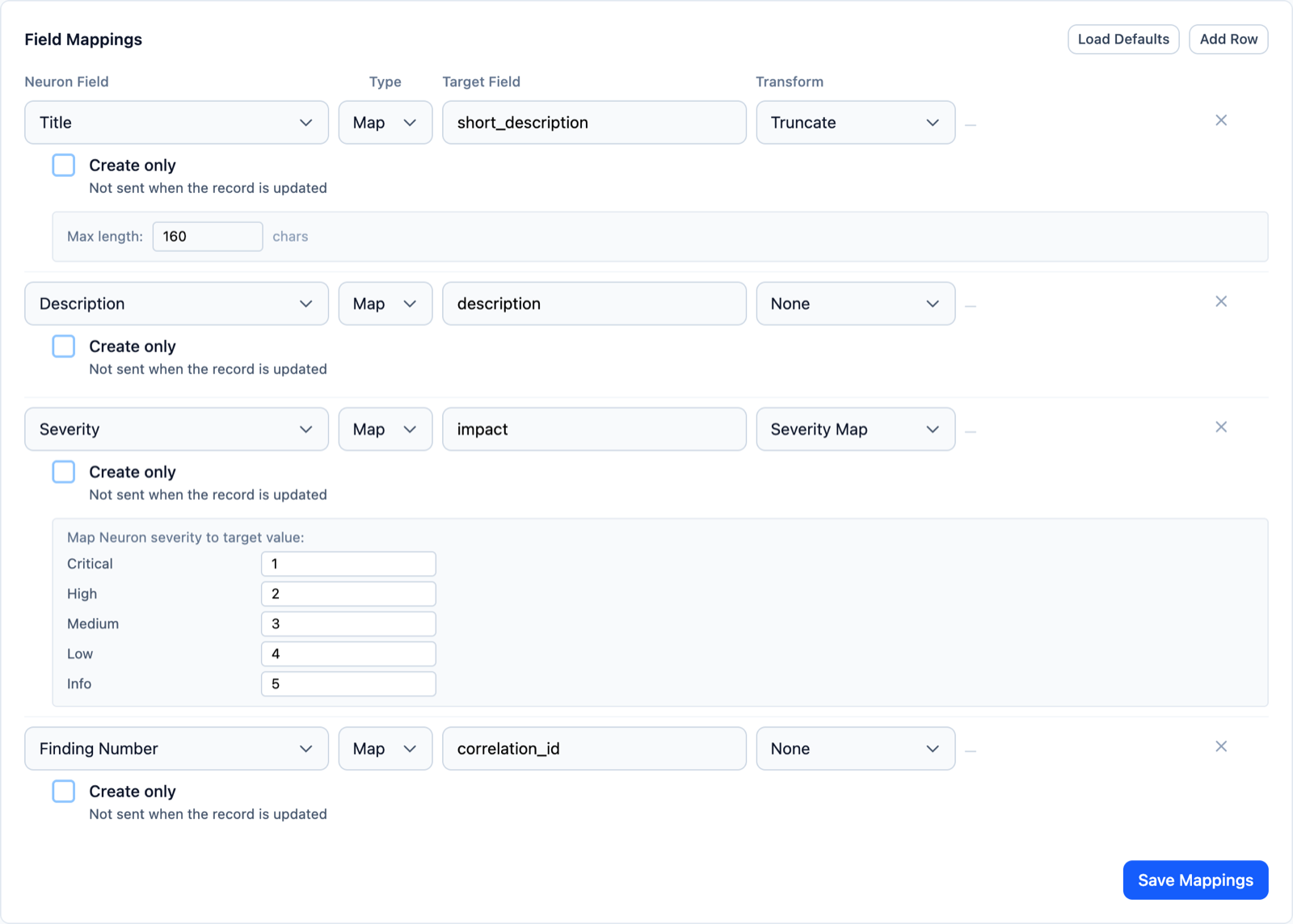
Field mappings let you shape the data rather than dump it:
- Truncate long titles to fit a short description field
- Severity Map turns your Critical to Low scale into the values the ticketing system expects
- Template builds a field from several finding values at once
- Strip markup or join lists where the target field expects plain text
Push History records every push with a link straight to the record it created or updated.
Routing Rules
Manual pushes work well for one-off findings. Most teams want something more predictable.
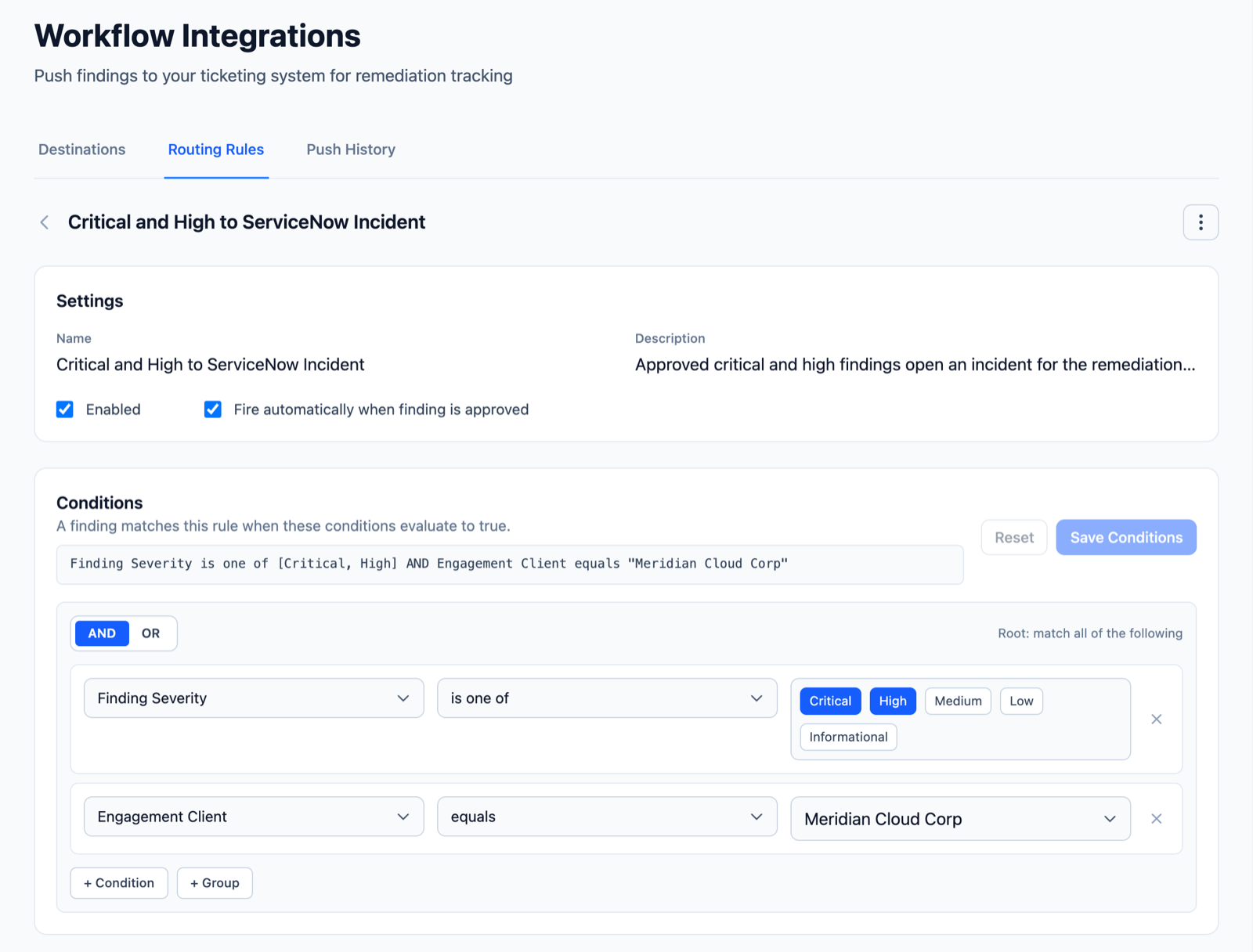
Routing Rules decide where a finding goes based on what it is. Build conditions with nested AND/OR groups using finding fields such as severity, status and assessment, or engagement fields such as client and language. Neuron shows the result as a plain-language sentence, so you can read a rule back and know exactly what it does.
Rules are evaluated top to bottom and the first match wins. Drag rules to change their order.
Switch on Fire automatically when finding is approved and the rule runs the moment a finding passes QA. Critical and high findings for one client can open incidents for that client’s remediation team, while everything else waits for a manual push. Nothing reaches the ticketing system before it has been reviewed.
Automatic pushes can be turned off globally, per connection or per rule, so you stay in control when an instance is under maintenance or a client changes process.
Test Before You Trust
Routing logic is only useful if you’re confident in it. The Test Rules tool lets you set hypothetical field values and see which rule would match, which profiles would push, and why any target would be skipped. You find out how a rule behaves before a real finding ever reaches a real ticket queue.
What This Means for Your Team
The handoff from testing to remediation stops being a copy and paste job. Findings reach the ticketing system in the shape that system expects, at the moment they’re approved, with a link back to the source. Your testers stay focused on testing, and your clients’ remediation teams start work sooner.
Workflow Integrations is a licensed Neuron module. If you’d like to see it in action, visit https://neuron.ws/demo (opens in a new tab)
Thanks for reading,
The PenTest.WS Development Team

See Neuron on your terms.
Tell us about your team and environment. We will show you Neuron running the way you would run it: on your infrastructure, under your control.